The Apple MagSafe Power Adapter Settlement, and How to Pick a Safe MacBook Charger Today
This is not the official settlement website anymore. From 2011 to 2013 this address hosted the official site of the MagSafe adapter class action. The case is closed and claims can no longer be filed. Today this page is an independent archive and charger guide, not connected to Apple, the court, or the settlement administrator.
On this page
- What went wrong with the “T” adapter
- Timeline
- Which MacBooks were covered
- What owners got, and what the lawyers got
- The original settlement FAQ, in plain English
- How the press covered it
- Which charger does my MacBook need?
- Higher or lower wattage: what happens
- The cable matters too
- How to spot a fake or unsafe charger
- Older MacBooks with MagSafe 1 or MagSafe 2
- Warning signs: when to stop using a charger
- One charger for your MacBook and your phone
- Sources
From 2011 to 2013, adaptersettlement.com was the official website of the MagSafe Power Adapter Settlement, a class action against Apple over the 60W and 85W MagSafe “T” chargers that came with early MacBook and MacBook Pro laptops. News sites linked here when the deal was announced, and many of those links still work. If you clicked one, this page tells you what happened to the case.
The second half is a practical guide for today: which charger your MacBook needs, what wattage means, and how to tell a safe charger from a risky one. This site is an independent archive and guide. It isn’t run by Apple, the court, or the claims administrator, and claims can no longer be filed.
Quick answers
- Can I still file a claim? No. The cash claim deadline was March 21, 2012, and Apple’s free replacement program ended years ago. See what owners got.
- Which charger does my MacBook need? A USB-C Power Delivery charger with at least the wattage Apple pairs with your model. Check the table.
- Is a non-Apple charger safe? It can be, if it supports USB-C Power Delivery, has enough watts, carries real safety marks, and comes from a seller you trust. How to spot a fake.
- What was this site? The settlement website set up for the court case, run by the claims administrator. Read the history.
Part 1: The MagSafe adapter lawsuit
The case was called In re MagSafe Apple Power Adapter Litigation, Case No. C 09-01911 JW, in the U.S. District Court for the Northern District of California. It ran from 2009 to 2015.
What went wrong with the “T” adapter
Apple introduced MagSafe in January 2006 with the first MacBook Pro. The plug was held on by a magnet. Apple’s marketing said that if the cord got yanked, it “simply breaks cleanly away, without damage to either the cord or the system.”
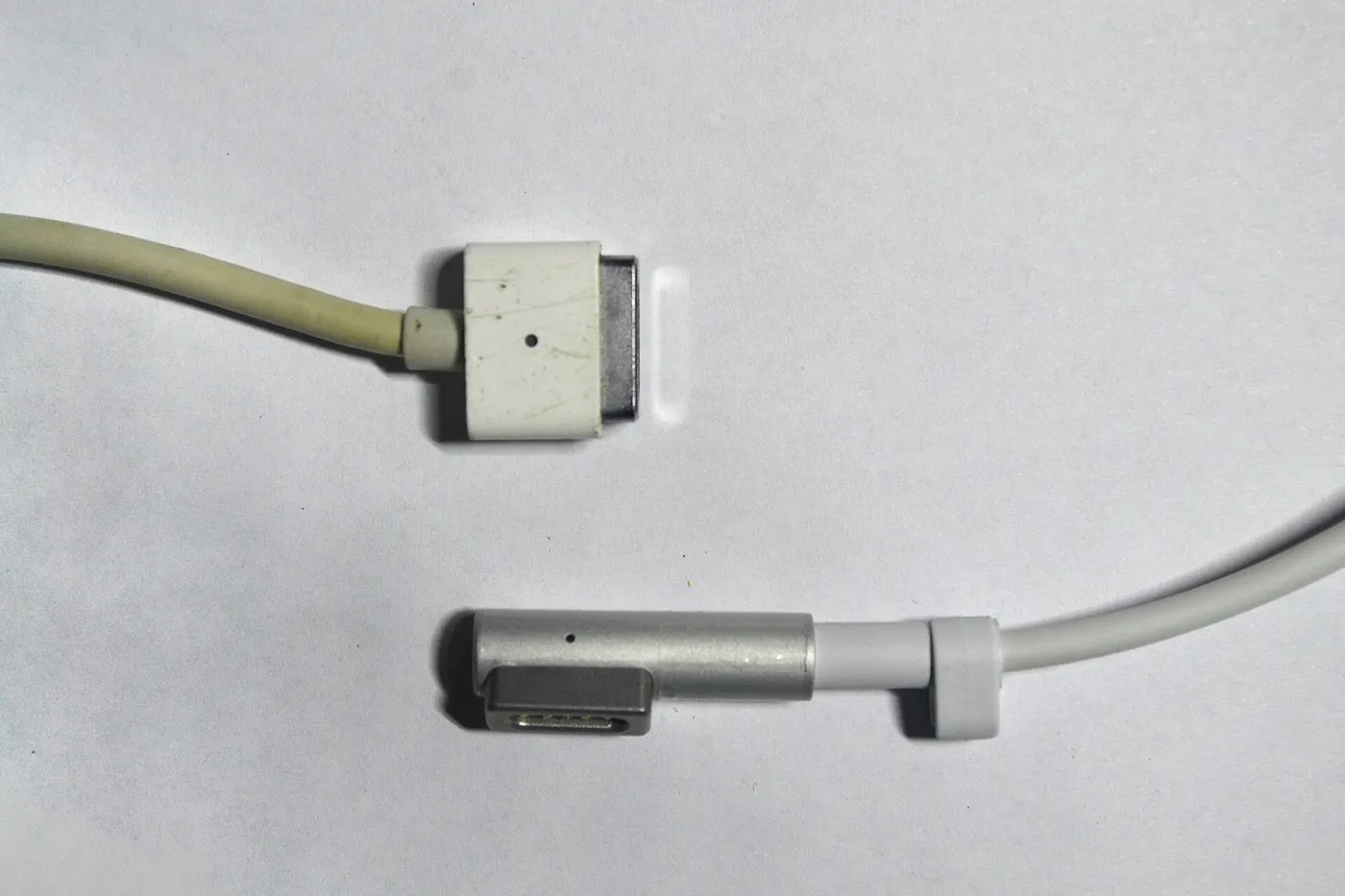
The early 60W and 85W adapters, model MPM-1, had a straight “T” shaped plug. Owners said the cable frayed right where it met the magnetic connector. The lawsuit described fraying, sparking, melting and overheating, and said exposed wires made the adapters a fire and shock hazard. It also said Apple sent no recall or warning, kept its extended replacement policy hard to find on its website, and replaced broken adapters with the same design.
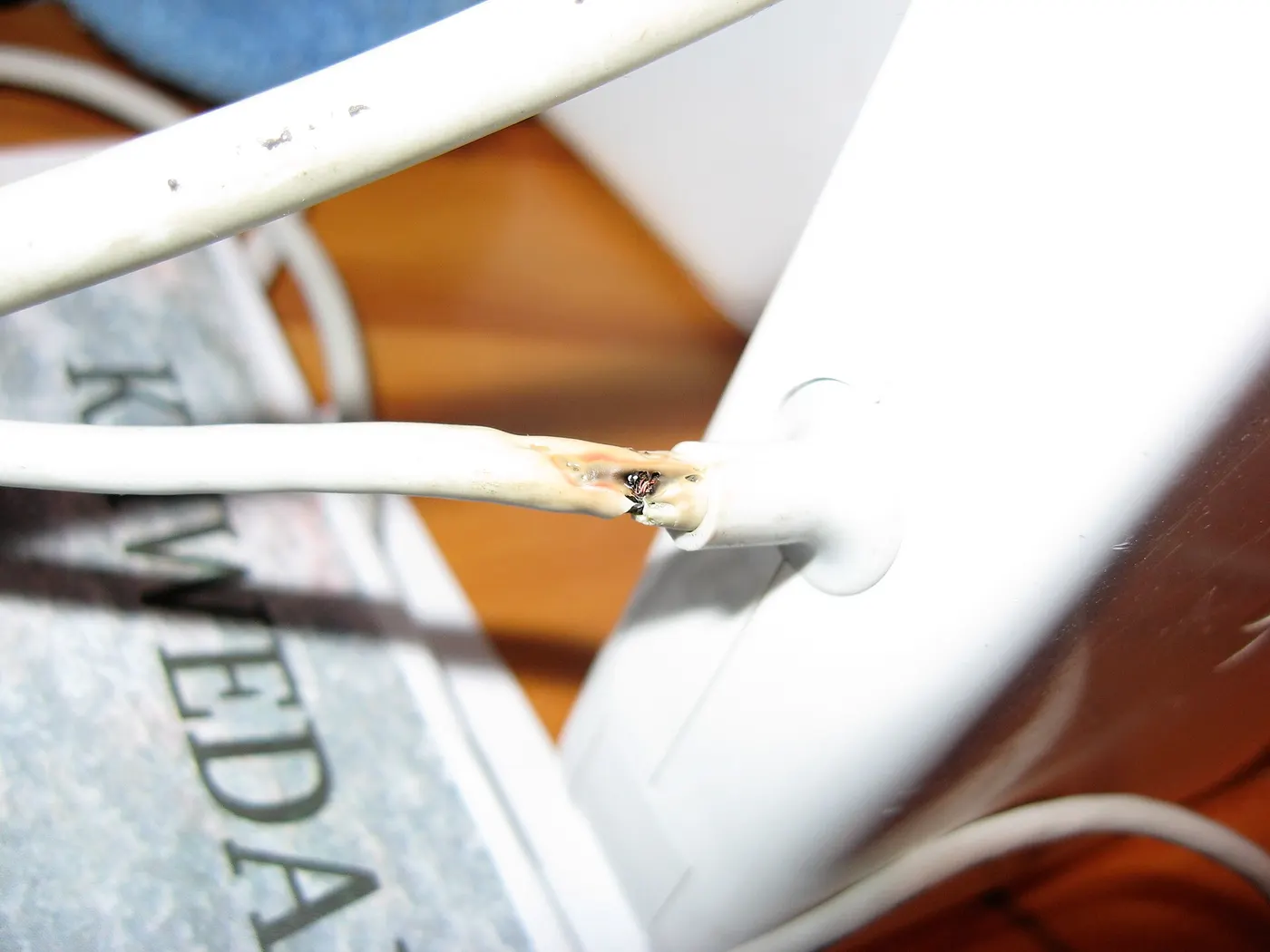
The amended complaint listed 14 claims, including California consumer protection laws, the federal Magnuson-Moss Warranty Act, breach of warranty, negligence, and failure to warn. Apple denied all of the allegations, and the settlement was not an admission of wrongdoing.
In a November 2011 support note, Apple described the typical failure as the white insulation separating from the magnetic end. It said an “L” style replacement adapter was fully compatible with Macs that came with a “T” style one.
Timeline
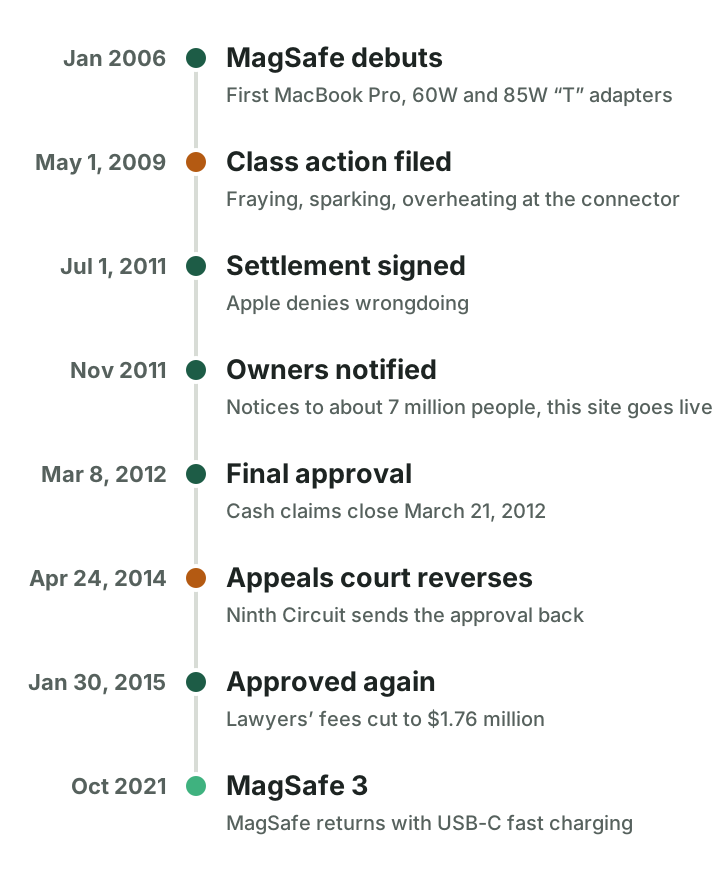
- January 10, 2006: Apple introduces MagSafe with the first MacBook Pro.
- May 1, 2009: Naotaka Kitagawa Jr., Timothy J. Broad and Jesse Reisman file a class action in the Northern District of California.
- May 15, 2009: Tracey Hackwith and Michael Martin file a similar case in the Central District of California. It’s moved and combined with the first case in November 2009.
- August 2010: Both sides spend two days in mediation with retired Judge Fern Smith.
- July 1, 2011: The settlement agreement is signed.
- September 27, 2011: Chief Judge James Ware grants preliminary approval.
- November 8, 2011: News sites start reporting on the settlement.
- November 22, 2011: Notice goes out and the claims period opens.
- January 6, 2012: Deadline to opt out or object.
- February 27, 2012: Fairness hearing.
- March 8, 2012: Judge Ware approves the settlement and the lawyers’ fees.
- March 21, 2012: Deadline to mail a cash claim.
- April 2, 2012: Final judgment.
- March to May 2012: Five objectors appeal to the Ninth Circuit.
- May 21, 2012: Earliest deadline to ask for a free replacement adapter (or three years from purchase, whichever was later).
- December 31, 2012: Original end date of Apple’s replacement program, later pushed to July 31, 2013.
- April 24, 2014: The Ninth Circuit reverses the approval and sends the case back. The next day it’s reassigned to Judge Edward J. Davila.
- January 30, 2015: Judge Davila approves the settlement again but cuts the fees.
- February 12, 2015: New final judgment.
Apple moved on to MagSafe 2 in June 2012, a thinner and wider connector with a T-shaped plug again. MagSafe 3 arrived in October 2021 with the 14-inch and 16-inch MacBook Pro.
Which MacBooks were covered
The class included every U.S. resident who was the original owner of a MacBook or MacBook Pro that shipped with a 60W or 85W MagSafe MPM-1 “T” adapter, including people who got the laptop as a gift. It also included anyone who bought one of those adapters on its own. Apple, companies it controlled, and its directors, officers and employees were left out.
The settlement called these laptops “Subject Computers.” This is the official list. The MacBook Air was not on it.
| Model | Versions on the list |
|---|---|
| MacBook 13-inch | May 2006, Late 2006, Mid 2007, Late 2007, Early 2008 |
| MacBook (White) | Late 2008 |
| MacBook (Aluminum) | Late 2008 |
| MacBook 13-inch | Early 2009, Mid 2009 |
| MacBook Pro | February 2006 |
| MacBook Pro 15-inch Glossy | May 2006 |
| MacBook Pro 17-inch | May 2006 |
| MacBook Pro 15-inch and 17-inch Core 2 Duo | October 2006 |
| MacBook Pro 15-inch and 17-inch 2.4 GHz | June 2007 |
| MacBook Pro 15-inch and 17-inch | Early 2008 |
| MacBook Pro 17-inch | Late 2008 |
| MacBook Pro (Aluminum) | Late 2008 |
| MacBook Pro 17-inch | Early 2009 |
| MacBook Pro 13-inch, 15-inch and 17-inch | Mid 2009 |
| MacBook Pro 15-inch 2.53 GHz | Mid 2009 |
What owners got, and what the lawyers got
Cash back for a replacement. If your adapter showed damage and you bought an Apple 60W or 85W MagSafe replacement before November 22, 2011, you could get money back. The amount depended on when you bought it, counted from when you bought the laptop or original adapter:
- In the first year: what you paid, up to $79 (not counting tax or shipping)
- In the second year: $50
- In the third year: $35
You needed proof of purchase and a paper claim form, and there was a limit of three refunds per computer.
A free replacement. Apple’s Adapter Replacement Program swapped adapters with “Strain Relief Damage” for free. The settlement defined that as fraying, melting, straining, sparking, weakening, discoloration, bubbling, overheating or separation at the adapter’s strain reliefs. You had three years from purchase or until May 21, 2012, whichever was later.
When the program ended. The sources don’t agree. The settlement said Apple would run the program until December 31, 2012. A supplemental notice to owners who bought in 2010 pushed that to July 31, 2013. Apple’s support page says today that the program ended on January 31, 2014.
The results. Notice went to more than 7 million people by email or mail. According to the 2015 court order, 16,006 valid cash claims came in, worth $797,757 in total. From November 2011 to July 2013, Apple handed out 92,332 replacement adapters, which the court valued at $7,294,228 at the $79 retail price. The court put the whole settlement at $8,091,985 and called the participation rate low. There were 11 objections and 61 opt-outs.
The lawyers. Apple paid the fees separately, so they didn’t come out of owners’ money. In March 2012, Judge Ware awarded class counsel $3,000,000 in fees plus $100,000 in expenses, and $5,000 to each named plaintiff.
The appeal. Five objectors appealed. Three of those appeals were dismissed. The judge required each objector to post a $15,000 appeal bond. One objector, Robert Gaudet Jr., refused, was held in contempt, and had his objection struck. Another, Marie Newhouse (formerly Gryphon), was represented by the Center for Class Action Fairness, which argued that owners got less than $900,000 while the lawyers asked for $3.1 million.
On April 24, 2014, the Ninth Circuit reversed. It said the trial court “abused its discretion” by approving the deal and the fees without following the review process from an earlier case, In re Bluetooth. That process asks judges to look closely for signs of collusion, such as lawyers’ fees agreed to be paid separately from the money for the class.
The 2015 do-over. Judge Davila approved the settlement again on January 30, 2015, but cut the fees to $1,762,096.10. That was about 29% less than the $2,473,589.50 counsel asked for on remand. Expenses stayed at $100,000, plus $5,000 each for five named plaintiffs.
It isn’t clear from the public record when the last cash payments went out. The settlement website itself still said an appeal was pending as late as 2022.
The original settlement FAQ, in plain English
The settlement website had 28 frequently asked questions. Here they are, retold in plain words. All the deadlines below have passed.
1. Why did I get a notice package?
The court ordered notice to go out to people who might be in the class. It explained the settlement and your options before the judge decided whether to approve it.
2. What is this lawsuit about?
The lawsuit claimed the 60W and 85W MagSafe MPM-1 “T” adapter frayed, sparked and stopped working too early, and that Apple misrepresented it. These were claims, not court findings.
3. Why is this a class action?
Five people, Naotaka Kitagawa, Timothy J. Broad, Jesse Reisman, Tracey Hackwith and Michael Martin, sued on behalf of everyone with similar claims. One court handled it for the whole group, except people who opted out. Judge James Ware was in charge.
4. Why is there a settlement?
The court never ruled for either side. Both sides agreed to settle to avoid the cost of a trial, and the plaintiffs and their lawyers believed it was the best deal for the class.
5. How do I know if I am part of the settlement?
You were in the class if you were a U.S. resident and the original owner of a MacBook or MacBook Pro that shipped with a 60W or 85W “T” adapter, or if you bought one of those adapters on its own. Getting the laptop as a gift counted.
6. Are there exceptions to being included?
Yes. Apple, companies it controlled, its directors, officers, employees and legal representatives were not included, and neither was anyone who opted out.
7. If I purchased a Subject Computer or Adapter but did not pay for a Replacement Adapter, am I included in the Class?
Yes. Even if you never bought a replacement, you could still get a free one if your adapter showed damage.
8. What are Subject Computers?
They were the MacBook and MacBook Pro models that shipped with a 60W or 85W “T” adapter. The full list is in the table above.
9. What does the settlement provide?
Cash back if you bought a replacement adapter within three years of buying your laptop or adapter, and before November 22, 2011. It also offered a free replacement if your adapter showed damage.
10. What cash payment amount can I get under the settlement?
Up to $79 for a replacement bought in the first year, $50 in the second year, and $35 in the third. You needed proof of purchase and a valid claim form, with a limit of three refunds per computer.
11. What can I get if my Adapter shows signs of Strain Relief Damage in the future?
A free replacement from an Apple Store, an Apple Authorized Service Provider, or AppleCare. You had three years from purchase or until May 21, 2012, whichever was later. The program was set to end December 31, 2012, but was later extended.
12. How can I get a cash payment?
You had to fill out a paper claim form, attach the documents it asked for, sign it under penalty of perjury, and mail it. The deadline was March 21, 2012.
13. When would I get my cash payment?
Only after the court approved the deal and any appeals were over. The notice warned that appeals could take more than a year, and in the end the case wasn’t finished until 2015.
14. What am I giving up to get a cash payment or stay in the Class?
If you stayed in the class, you couldn’t sue Apple on your own over the same issues, and the court’s orders applied to you. Signing the claim form also meant agreeing to a release of those claims.
15. How do I get out of the settlement?
You had to mail the exclusion section of the claim form with your name, address, phone number, laptop serial number and signature to the claims administrator, Kurtzman Carson Consultants, in Providence, Rhode Island. It had to be postmarked by January 6, 2012. Phone, fax and email requests didn’t count.
16. If I don’t exclude myself, can I sue Apple for the same thing later?
No. Staying in the class meant giving up the right to sue Apple over the claims the settlement covered.
17. If I exclude myself, can I get money from this settlement?
No. People who opted out got nothing from the settlement but kept their right to sue on their own.
18. Do I have a lawyer in this case?
Yes. Helen I. Zeldes of Zeldes & Haeggquist in San Diego and Steven A. Skalet of Mehri & Skalet in Washington, DC represented the class at no cost to members. You could also hire your own lawyer and pay for it yourself.
19. How will the lawyers be paid?
Class counsel planned to ask for up to $3.1 million in fees and expenses, plus $5,000 for each plaintiff. Apple agreed not to oppose this and to pay it separately, along with the cost of running the settlement. See what the lawyers got.
20. How do I tell the Court that I don’t like the settlement?
You could send a letter with your details, your serial number and your reasons. It had to reach the court, class counsel and Apple’s lawyer, Penelope A. Preovolos of Morrison & Foerster, by January 6, 2012. The original page misprinted that date as January 6, 2011.
21. What’s the difference between objecting and excluding?
Objecting meant staying in the class and telling the court what you didn’t like. Excluding meant leaving the class, so you had nothing to object to.
22. When and where will the Court decide whether to approve the settlement?
At a fairness hearing at 9:00 a.m. on February 27, 2012, in Courtroom 9 of the federal courthouse at 450 Golden Gate Avenue in San Francisco. Judge Ware approved the deal on March 8, 2012.
23. Do I have to come to the hearing?
No. A written objection that arrived on time was enough. You could still attend, or send a lawyer, at your own expense.
24. May I speak at the hearing?
You could ask for permission by sending a letter that reached the court and both sides’ lawyers by January 6, 2012. People who opted out couldn’t speak.
25. What happens if I do nothing at all?
You stayed in the class but got no cash unless you filed a claim on time. You also gave up the right to sue Apple over these issues.
26. Are there more details about the settlement?
Yes. The full settlement agreement and court papers were on file with the court clerk in San Francisco. Today you can follow the case on the CourtListener docket.
27. How can I find my Serial Number?
The site pointed to Apple’s support pages on finding the serial number of a MacBook or MacBook Pro, with PDF copies of both.
28. How can I get a duplicate receipt for my purchase of an Apple MagSafe Adapter?
If you bought a replacement from Apple and lost the receipt, you could request a copy from Apple online. Apple said it would send it within 10 business days.
How the press covered it
- MacRumors, November 8, 2011: settlement reached over frayed MagSafe connectors
- Engadget, November 8, 2011: Apple launches a MagSafe replacement program
- AppleInsider, November 8, 2011: Apple notifies owners of the settlement
- Macworld, November 8, 2011: Apple settles and offers replacements
- SlashGear, November 8, 2011: details of the cash payments
- heise online (Mac & i), November 9, 2011: German-language report on the settlement
- The Register, November 10, 2011: the replacement offer
- iLounge, November 15, 2011: what MacBook owners could get
- CNET, November 16, 2011: Apple agrees to the settlement
- The Atlantic, November 2011: a look at Apple’s power cord fix
- Neowin: replacements for MacBook owners
- ZDNet, January 3, 2012: claim deadlines getting close
- Cult of Mac, January 4, 2012: two months left to claim
- Engadget, January 5, 2012: deadline reminder
- Consumer Reports, March 2012: the settlement explained for consumers
- Ken Shirriff’s blog, November 2015: a teardown of the genuine 85W charger that cites the lawsuit
Part 2: How to pick a safe MacBook charger today
The T-shaped MagSafe plug is long gone, but the basic question hasn’t changed: is this charger right for my Mac, and is it safe? Here’s what to check as of October 2026.
Which charger does my MacBook need?
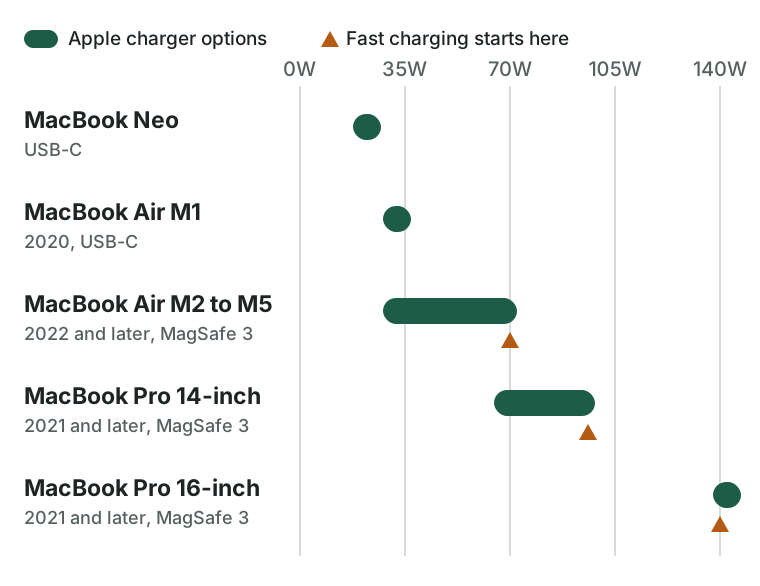
These are the adapters Apple pairs with each model. Fast charge means about 50% battery in around 30 minutes.
| Model | Charger Apple pairs with it | Fast charge needs |
|---|---|---|
| MacBook Neo | 20W USB-C adapter with a USB-C cable | Not on Apple’s fast charge list |
| MacBook Air, 2018 to 2021 (including M1) | 30W USB-C, or 40W Dynamic Power Adapter with 60W Max, with a USB-C cable | Not on Apple’s fast charge list |
| MacBook Air, 2022 and later (M2 to M5) | 30W (13-inch only), 35W Dual, 67W or 70W, with a USB-C to MagSafe 3 cable. The M5 model comes with the 40W Dynamic Power Adapter with 60W Max in the US | 70W or more (67W also works on the 13-inch) |
| 14-inch MacBook Pro, 2021 and later | 67W, 70W or 96W with MagSafe 3. M5 and the 15-core M5 Pro get 70W, the 18-core M5 Pro and M5 Max get 96W | 96W or more |
| 16-inch MacBook Pro, 2021 and later (including M5 Pro and M5 Max) | 140W with MagSafe 3 | 140W with the MagSafe 3 cable, or with Apple’s 240W USB-C cable on models from November 2023 on |
| 16-inch MacBook Pro, 2019 | 96W USB-C | Not on Apple’s fast charge list |
| 15-inch MacBook Pro, 2016 and later | 87W USB-C | Not on Apple’s fast charge list |
| 13-inch MacBook Pro, 2016 and later | 61W USB-C | Not on Apple’s fast charge list |
Buying in the UK or Europe? On Apple’s UK and German stores, the MacBook Neo, MacBook Air and MacBook Pro come with the cable only, and the power adapter is sold separately. Check the “In the Box” list for your country before you order, so you’re not left without a charger. Shopping in the Czech Republic? Vyberomat’s MacBook buying guide (in Czech) compares the current models and lists the charger wattage each one needs.
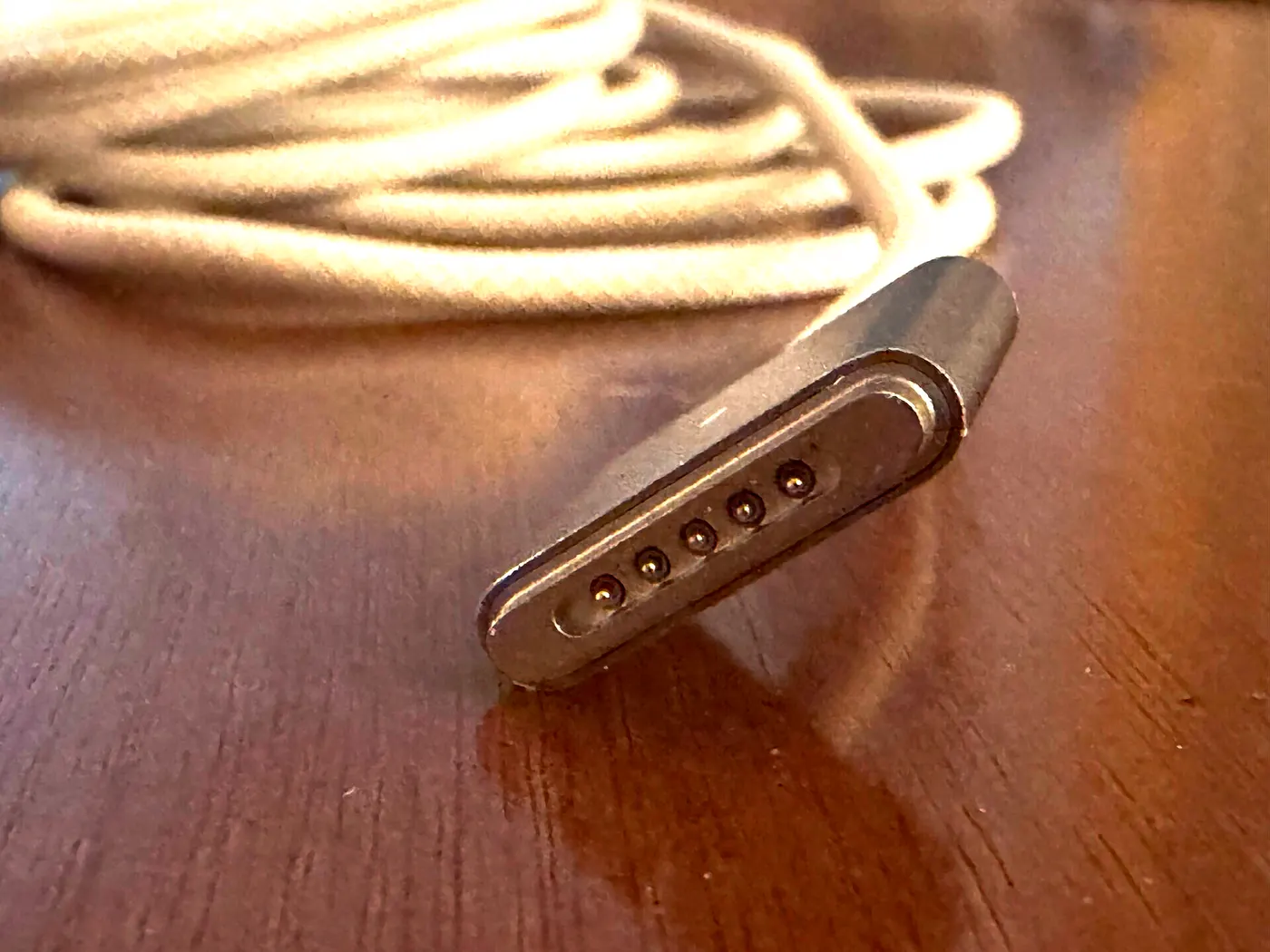
MagSafe 3 or USB-C? MacBook Air models from 2022 on and MacBook Pro models from 2021 on have MagSafe 3, except the 13-inch M2 MacBook Pro from 2022. These Macs can charge through MagSafe 3 or a USB-C port. If you plug in more than one charger, the Mac takes power from just one port, the one that gives the most. The light on the MagSafe 3 connector is amber while charging or on hold, and green when full. If it keeps flashing amber, clean the port and the connector. MagSafe 3 doesn’t work with older MagSafe adapters.
Higher or lower wattage: what happens
Apple says any USB-C charger or display that supports USB Power Delivery (USB PD) will charge a Mac with USB-C charging, even if its wattage is higher or lower than the one Apple pairs with it. For the best results, use at least the recommended wattage.
- Higher wattage is fine. With USB PD, the charger and the Mac agree on how much power to send before charging starts. You can use a 140W charger with a MacBook Air.
- Lower wattage is slower. The Mac still charges, just more slowly. On macOS Tahoe 26.4 or later, the battery menu shows “Slow Charger” when the wattage is too low.
- Over 100W needs a newer standard. Older USB PD topped out at 100W. The USB PD 3.1 update in 2021 raised that to 240W and added a 28V level. Apple’s 16-inch MacBook Pro is rated at 28V and 5A, so a charger that stops at 100W can’t give it the full 140W.
The cable matters too
A great charger with the wrong cable still charges slowly, or not at all.
- Some USB-C cables carry data only and won’t charge a Mac. If yours doesn’t charge, try another cable first.
- Watch the power rating. Cables are rated for a set amount of power. For 100W you need a 5A cable (20V at 5A), and fast charging the 16-inch MacBook Pro over USB-C needs a 240W cable. USB-IF certified cables can carry a logo with the word “CERTIFIED” and the power rating, such as 60W or 240W, and the cable has to be on the USB-IF’s official list.
- Stop using a cable that only works when you wiggle it.
- Don’t bend it in the same spot over and over. Apple warns that this can weaken a cable. Check yours for kinks and breaks now and then, especially near the plugs, which is exactly where the old T adapters failed.
How to spot a fake or unsafe charger
Apple warns that chargers that don’t meet safety standards could pose a risk of death or injury. Fake chargers can look a lot like the real thing. The biggest differences are inside.
What a teardown found. Engineer Ken Shirriff took apart a counterfeit 45W MagSafe charger in 2016. The gap between the high-voltage side and the side you touch was under 1 mm, when at least 4 mm is needed. There was no insulating tape, the metal ground pin wasn’t connected, and the output was noisy. It also had no controller, so the plug was live all the time. A genuine Apple 85W charger has about 6 mm of separation and a tiny microcontroller that only turns the power on about a second after the Mac connects.
What a big test found. In a 2016 test in the UK, 397 of 400 counterfeit Apple chargers failed a basic insulation safety test.
What the marks mean.
- CE (Europe) and UKCA (Great Britain) are declarations by the maker. The European Commission says CE doesn’t mean a product was approved as safe by the EU or any other authority. Coverage of the 2016 test also pointed out that a CE mark is easy to forge.
- UL, ETL and CSA marks come from independent testing labs. In the US, OSHA keeps a list of recognized labs, including UL, Intertek, CSA Group, TÜV Rheinland and TÜV SÜD. A real mark means a lab tested the product, but fakers copy logos too, so where you buy still matters.
A quick checklist:
- Buy from Apple or a seller you trust, not a random marketplace listing.
- Make sure it supports USB-C PD and has enough watts for your Mac.
- Look for an independent lab mark, not just CE.
- Check the printing. Fakes have shown misspellings like “Abble” and crooked serial number labels.
- Look at the build: uneven seams, a plastic ground pin, or a weight and feel that seem off are warning signs.
Older MacBooks with MagSafe 1 or MagSafe 2
If you still use an older Mac, here’s what fits:
- Original MagSafe Macs work with both T-style and L-style MagSafe adapters.
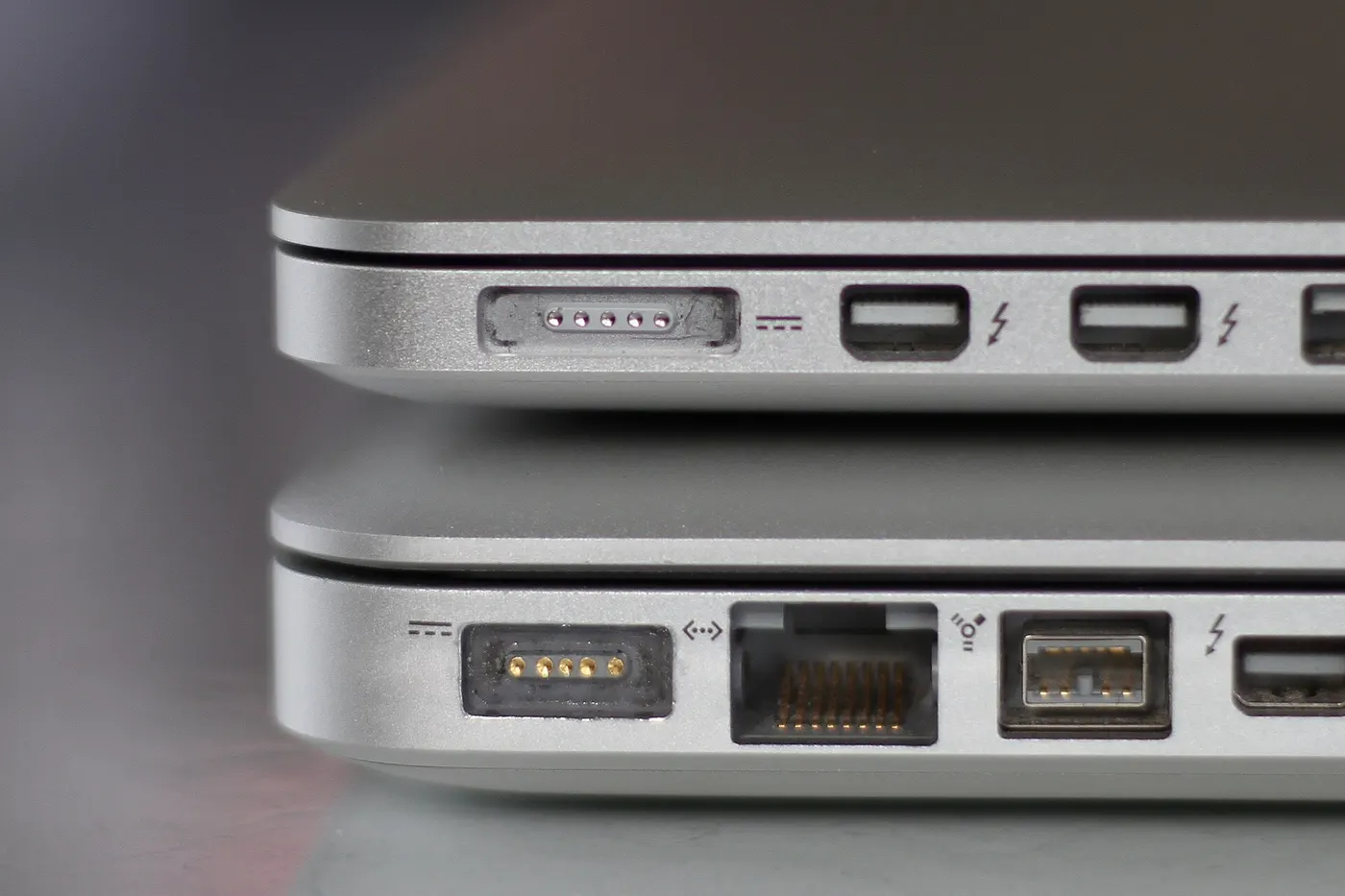
- MagSafe 2 Macs work with a MagSafe 2 adapter, or with an original MagSafe adapter through Apple’s MagSafe to MagSafe 2 Converter. The converter doesn’t work with MagSafe 3.
- Wattage: Apple’s 2011 guidance was that a higher wattage MagSafe adapter is fine, but a lower one can cause problems.
- Finding a new one: Apple’s US store no longer sells the 60W and 85W MagSafe 2 adapters, and its current replacement lists only include USB-C adapters and the MagSafe 3 cable. So if you need one, you’ll be buying from someone else, and the fake that Shirriff opened was a MagSafe charger. Be extra careful where you buy.
Warning signs: when to stop using a charger
Apple’s guidance is clear. Stop using a charger or cable if you see any of these:
- Wear or breaks in the outer layer of the cable
- Bent, loose or broken prongs
- Sparks coming from anywhere other than the plug blades
- A cracked or discolored case
- Popping sounds
- A charger that doesn’t power your Mac
- On MagSafe 2 or older, the thin cable separating from either end
- A charger that was dropped or got wet
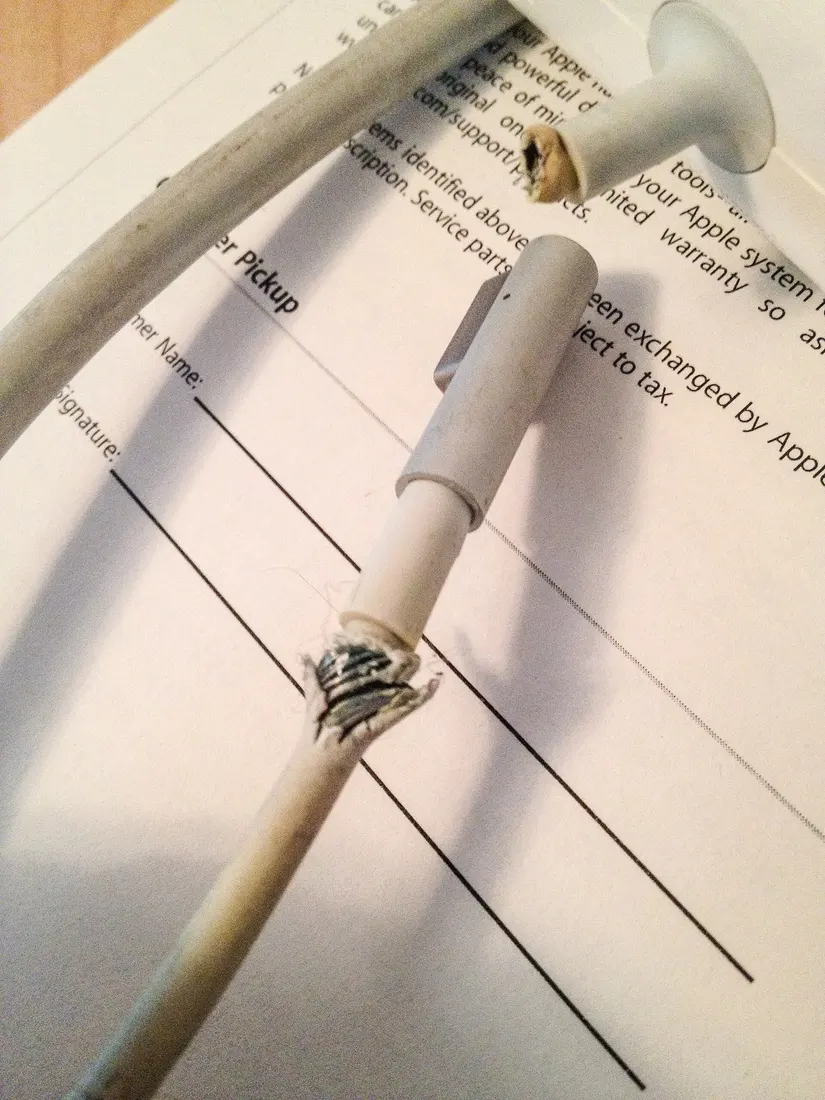
A few habits help too. Pull the plug by the connector, not the cable. Use the charger somewhere with air around it. Keep it off the couch and out of your bed, and don’t cover it with a blanket or pillow. It’s normal for a charger to get warm, and it may switch off if it gets too hot. If it shuts off because of electrical noise from things like a fridge, unplug it for 60 seconds (MagSafe) or 30 seconds (USB-C) and try again.
One charger for your MacBook and your phone
A charger with several USB-C ports can charge your MacBook and your phone at the same time. Even Apple sells a 35W Dual adapter for the MacBook Air. Just keep in mind that the ports share one power budget.
- Check two numbers: the total watts and the most a single port can give. A 100W charger with two ports can’t give 100W to each port at the same time.
- Your Mac’s port needs enough on its own. If the MacBook gets less than it needs while the phone is plugged in, it charges more slowly.
- Phones charge at very different speeds. A phone only takes the power it supports, so a bigger charger won’t make a slow-charging phone faster. If you’re picking a new phone and want one that lasts and charges fast, compare battery and charging specs of current phones before you decide how big a charger you need.
- The safety rules don’t change. Look for USB-C PD support, independent safety marks, and a trustworthy seller.
Sources
Court records
- CourtListener docket, In re MagSafe Apple Power Adapter Litigation
- Order granting preliminary approval, September 27, 2011 (Dkt. 82)
- Order granting final approval and fees, March 8, 2012 (Dkt. 107)
- Order granting final approval and reducing fees, January 30, 2015 (Dkt. 266)
- Ninth Circuit memorandum: In re Magsafe Apple Power Adapter Litig., 571 Fed. Appx. 560 (9th Cir. 2014)
Archived settlement website
- Home page, January 2012
- Frequently asked questions, January 2012
- Important dates and deadlines, January 2012
- Class notice (PDF)
- List of covered computers (PDF)
- Supplemental notice of date extension (PDF)
- Frequently asked questions, February 2015
- Home page, May 2022
- Apple support note TS1713, November 2011
Apple support pages
- Apple: MagSafe Adapter Replacement Program (ended)
- Use a power adapter with your Mac
- Charge your Mac laptop computer
- Apple: fast charging a Mac laptop
- Apple: troubleshooting USB-C charging
- Apple: MagSafe adapters and connectors
- Using Apple power adapters, cables, and duckheads
- MacBook Pro important safety information
- MacBook Pro important handling information
- MacBook Neo specs, MacBook Air specs, MacBook Pro specs
- MacBook Neo specs (UK), MacBook Air specs (UK), MacBook Pro specs (UK), MacBook Pro specs (Germany)
- Apple introduces MagSafe 3 with the new MacBook Pro, October 2021
- AC wall plug adapter recall, 2016 notice, 2019 notice
Standards
- USB-IF: USB PD 3.1 announcement (PDF)
- USB-IF: USB Charger (USB Power Delivery)
- USB-IF: USB Type-C cable power rating logo guidelines (PDF)
- European Commission: CE marking
- GOV.UK: Using the UKCA marking
- OSHA: Current list of NRTLs
- CPSC: Apple recalls three-prong wall plug adapters, 2019
Teardowns and tests
- Ken Shirriff: Counterfeit MacBook charger teardown, 2016
- Ken Shirriff: Genuine MacBook charger teardown, 2015
- BetaNews: fake Apple chargers fail safety tests, 2016
- iPhone in Canada: fake chargers fail safety tests, 2016
- Wikipedia: MagSafe
Last checked: October 21, 2026.